










inventory one

Resource management for schools

Three classes need the projector at the same time and nobody knows who has it. In schools, many resources are shared by everyone and coordinated by no one. Inventory ONE shows which equipment is available when and who is currently using it.
Over 10,000 satisfied users trust in Inventory ONE
proven expert logoGoogle LogoCapterra logoSoftware Advice Logo
The app for your inventory displayed on three smartphones
Training Center North Logo
Text Bachenberg Logo
Text Builder Logo
Text Liceria Logo
Sunstone text logo
Waldbrunn Text Logo
Binz Text Logo
Solms Text Logo
[borlabs-cookie id="youtube" type="content-blocker"]https://youtu.be/aEU8KBVmAAU[/borlabs-cookie]
Manage equipment and school resources centrally

Digital resource management for schools

Maintain an overview of your resources at all times and ensure transparent, digital management of all school resources. No more confusing lists, Excel files and paper chaos! With our resource management system, schools can manage their resources easily, digitally and centrally in one place. Maintain an overview of technical equipment, teaching materials, furniture, sports equipment, workshop equipment and other important resources at all times - across all locations and in real time. From the allocation of equipment to teachers, classes or departments to the planning and documentation of maintenance, inspections and repairs, our digital equipment management system supports you in all day-to-day school tasks. This reduces manual administrative work, avoids unnecessary costs and creates greater transparency in the use and management of your equipment. With Inventory ONE, you can organize your equipment smarter, save valuable time and create efficient processes for the entire school.
Simply manage.

What you record in Inventory ONE

Mobile presentation technology
Projectors, loudspeakers, microphones and cameras that move between classrooms - with current availability status.
Sports equipment & teaching aids
Team balls, sports mats, experiment kits and collections of teaching materials - with distribution to the class or teacher.
Janitor equipment
Tools, cleaning equipment and technical equipment of the janitor with location and issue history.
Event equipment
Stage equipment, sound technology and seating for school events - with issue and return tracking.
Everything under control.

So the right equipment is always available

Availability status in real time

Each item of equipment shows its current status: available, issued, under maintenance or defective. Teachers and secretaries can see immediately what is available - without having to call or search.

Plan expenses for classes and lessons in advance

Assign resources to a specific class or appointment. Double bookings are automatically prevented - the projector cannot be in two classrooms at the same time.

Track returns automatically

Resources that have not been returned appear automatically in the dashboard. The teacher responsible can be reminded directly from the app - no more manual inquiries in the staff room.

Monitor consumables for specialist rooms

Chemicals, laboratory consumables, printer paper, toner - Inventory ONE automatically sends a notification if a minimum stock level is not reached. Reorders are placed in good time.
Highlight Features

Everything your inventory management
really needs.

Inventory

Carry out your inventory digitally - simply record, count and update stock in real time using the app.
Learn more

QR, barcode, NFC tag

Each inventory item is uniquely identified by QR code - simply scan and you're done.
Learn more

Internationalization

Use Inventory ONE in your language - the app is available to your team in several languages.
Learn more

Team Chat

Communicate directly in the app - write to your team without external tools or detours.
Learn more

Processes

Create your own workflows and automate recurring processes - without any IT knowledge.
Learn more

Reservations

Plan resources with foresight and keep an eye on availability at all times.
Learn more
Well thought out and tried and tested

School resource management made easy

If you lack an overview of your equipment and resources, our digital equipment management for schools can be an enormous help. It offers sophisticated and tried-and-tested functions that simplify the management of your school resources enormously. With optional QR codes available, you can call up important information in seconds and carry out necessary actions quickly and easily - whether you are in the classroom or on the move.

More about Resource management with Inventory ONE.

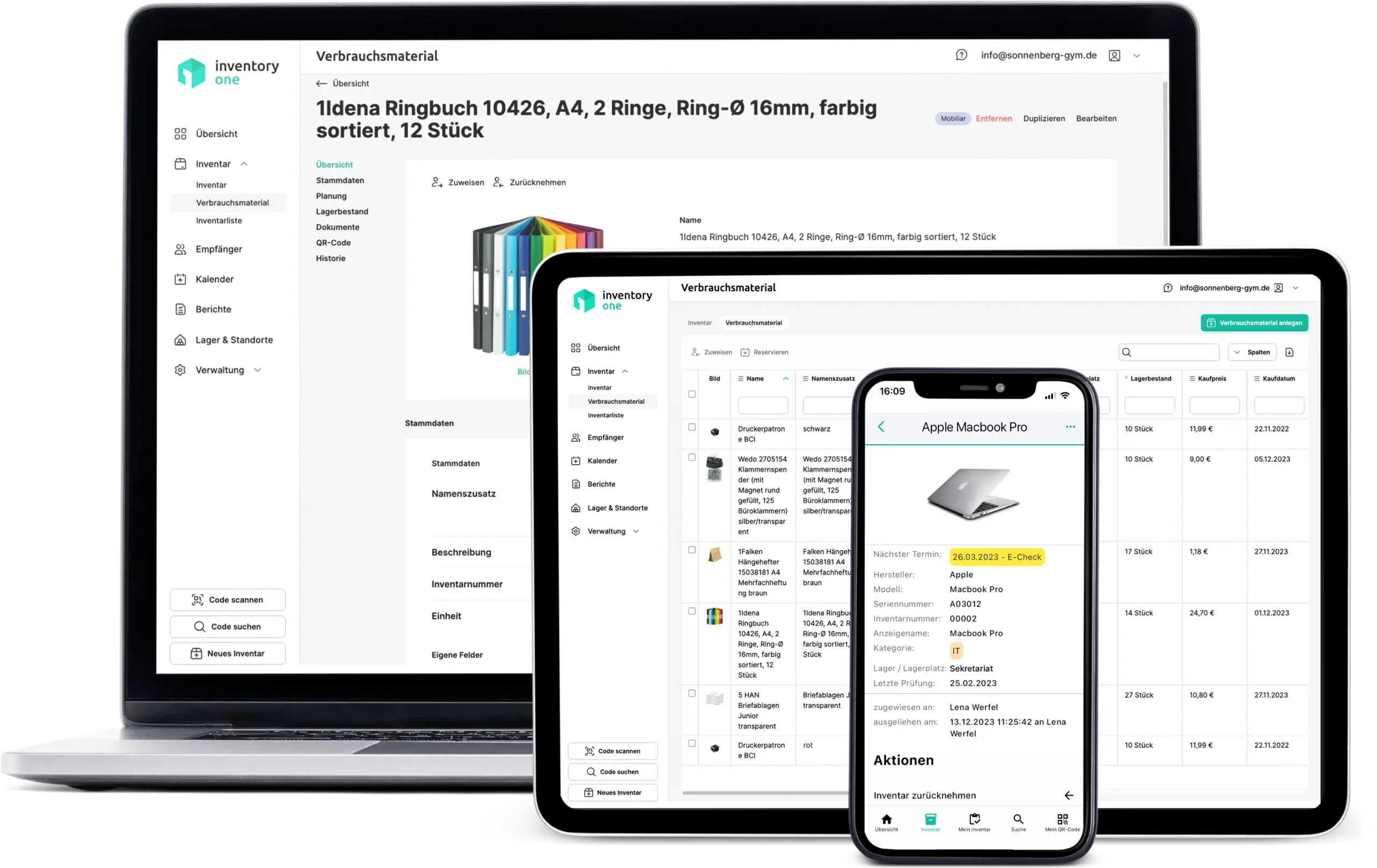
Digital resource management for schools displayed on a tablet
Functions that really help

THE resource management system for schools

Click on a topic to find out more.

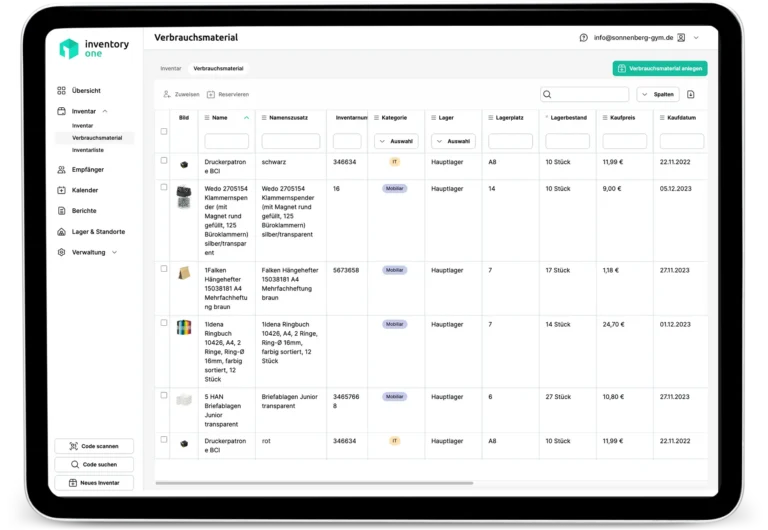
With Inventory ONE, you can see at any time where which equipment is located, who is currently using what, who has reserved what and when, or whether maintenance or inspection dates are due for certain devices. Your stock is also always visible.

Inventory ONE also gives you a very good overview of your consumables, such as copy paper, pens, etc., at all times. When the specified quantity of a material is reached, you are automatically reminded via the application and by e-mail of what needs to be reordered.

Appointments can be created to ensure that your equipment is always in good working order so that you do not miss any maintenance or prescribed inspections. You will be automatically reminded of the appointment in the app and by email if you wish.

With Inventory ONE, every authorized person has access to information about the equipment. In addition to the overview, reservations and appointments, you can also upload information (such as operating instructions) for a device, which can be accessed anytime and anywhere.

Inventory ONE can process scanned QR codes. Although these are not absolutely necessary, they save you a lot of time if you want to enter new equipment or retrieve data on existing inventory. Inventory ONE offers QR codes that are ideal for this at a reasonable price (More info). Inventory ONE can also process the existing barcodes on your equipment.

Assignments in Inventory ONE are very flexible. Inventory can be assigned not only to colleagues and employees, but also to external persons, projects, locations and rooms. You can also flexibly set the access rights in Inventory ONE. Employees can independently pass on and exchange equipment among themselves and document this in a verifiable manner. For example, if you assign a device to an employee, this action is actively confirmed by the employee concerned. The same happens in reverse when the equipment is returned.

When equipment is issued or loaned out, you can quickly find each individual piece of equipment using our detailed search function. You can also specify whether employees can search the entire equipment or only for individual devices assigned to them.
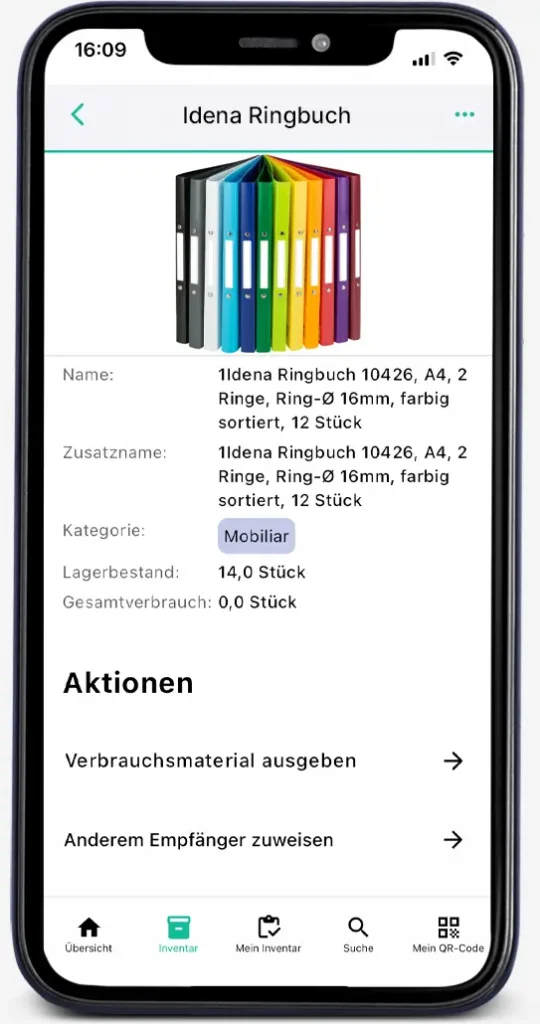
Digital resource management for schools displayed on a smartphone
Click on a topic to find out more.

To organize your equipment in the best possible way, you need the option of reserving individual devices directly in the system. This is exactly what Inventory ONE makes very easy to do. This practical function will help you to plan the use and availability of equipment well. This avoids annoyance among colleagues and nobody is unpleasantly surprised if, for example, a piece of equipment that is urgently needed is not available.

Should certain devices ever cause problems or become damaged, teachers and staff can record this directly in the app. In their overview, those responsible can always see whether a new problem has been reported and can therefore react in good time. This prevents the problem from being remembered until someone already needs the device.

With Inventory ONE, you can see the "CV" of all devices. How long has it been at the school, who has used it and for how long, and what was its overall utilization? When was it broken, when was it repaired and when was it serviced? This information is not only helpful as proof, but also when planning the purchase of new equipment. Our software makes the complete documentation of your equipment very easy.

For the initial equipment of new employees or for recurring projects, Inventory ONE supports you in issuing the required operating resources. In this case, lists can be defined which operating resources are issued as standard. This saves you a lot of time with recurring tasks.

Have you already recorded your operating resources in a large Excel list or have you been using other software to manage your operating resources? In this case, we will be happy to help you move to Inventory ONE. With our data import, the switch is usually straightforward. And if the existing data is somewhat more complex, we will be happy to help you with the import.

Inventory ONE was developed to make the day-to-day work of schools much easier. It may make sense to integrate the application into your IT environment. If you need interfaces for this, please contact us.

Inventory ONE is currently available in German, English, French and Italian. Other languages will follow. If you urgently need another language, please let us know. Our experts will try to help as quickly as possible.

Inventory management construction excavator
From the field.

Practical example: Projector chaos at a comprehensive school with 8 mobile devices

A comprehensive school with 1,200 pupils had eight mobile projectors that were shared by all the teachers. They were issued via a paper list in the secretary's office - with the result: double bookings, projectors disappeared for days, and a teacher regularly stood in front of an empty trolley. Since the introduction of Inventory ONE, teachers have been booking projectors directly in the app. Availability is visible in real time and double bookings are automatically prevented. Devices that are not returned appear as overdue the following day. The secretary's office has had significantly fewer queries since then.

Our Customers are Enthusiastic and you will be too.

Over 10,000 satisfied users already rely on our solution.
proven expert logoSoftware Advice LogoGoogle LogoCapterra logo
"We are very satisfied with Inventory ONE. It has helped us a lot to know which department our IT equipment is in. We can now assign the cost centers perfectly. The onboarding helped a lot to set everything up correctly."
Yasin Teber
"We were finally able to replace our old Excel spreadsheets with Inventory ONE. It's now very easy to keep the data up to date. We use it to manage inventory levels and inspection dates."
Maike Silberhaupt
"Since we started using inventory management, we finally have an overview of our inventory and have been able to avoid unnecessary new purchases for new employees."
M.C.
"Inventory ONE has been successfully integrated into our company processes. Implementation went quickly and smoothly. The application is intuitive to use and creates added value in daily use. We are very satisfied and appreciate the partnership-based cooperation."
Fabian Blankenhorn
"Inventory ONE fulfills everything you need for a structured IT inventory. The interface is clear, the range of functions is sufficient and the application is stable. Support responds quickly and provides straightforward assistance. The price is fair for what it offers."
Thomas Knoll
"The database is used daily and is very helpful for our clothing administration. If we have a problem, we can always contact support and the problems are solved within a short time."
Anonymous
Independent, secure, expandable, ...

Many other advantages

versatile
With Inventory ONE, you can not only manage operating resources in the form of equipment or tools. Equipment such as vehicles can also be excellently organized.
customizable
Does your school have special requirements and need a digital resource management system that is precisely tailored to your work processes? No problem - our experts will find / develop a solution.
App
Inventory ONE can be used with all common browsers. An app solution that is independent of the browser is also available: For Android and iOS.
GDPR-compliant
Your data is stored exclusively in German data centers. The data is processed in accordance with the GDPR requirements. Read more in the privacy policy.
tailored

Thanks to regular feedback from Inventory ONE customers, the application is continuously optimized and tailored to the demands of your daily work. Of course, you’re also welcome to share your requests and ideas with us. The goal of Inventory ONE is to make your digital Resource management to make it even better.

inexpensive
Have you already looked into digital resource management and researched solutions? Then you will have noticed: Inventory ONE is amazingly affordable. Especially when you consider all the features you get as a team. 
location-independent
Inventory ONE gives you maximum independence. With our application, you are not tied to one location or one device. With a smartphone or tablet, you have access to the entire management of your operating resources anywhere and at any time.
intuitive
The Inventory ONE application is not only extremely helpful in your day-to-day work, but also very easy to use. It does not require any prior knowledge, nor does it require a long training period. Inventory ONE is uncomplicated and self-explanatory.
system-independent
As a digital application, you can use Inventory ONE with any PC, Mac, tablet or smartphone. No special hardware requirements are needed. Inventory ONE can be used via any standard browser. All you need is a connection to the Internet.
mobile optimized
Experience has shown that the best place to manage resources is not always the desk in the office. On-site use in the classroom, at meetings or on the move is often extremely helpful. That's why Inventory ONE is of course also optimized for mobile devices. You can also manage your equipment perfectly on small devices.
Digital resource management for schools displayed on mobile devices
  • Made & Hosted in Germany
F.A.Q.

Frequently asked questions

No. Inventory ONE runs on any PC, Mac, tablet or smartphone via the browser. There are also native apps for Android and iOS. The only requirement: an internet connection.

Most companies are up and running within an hour. Inventory can be created manually or imported directly via data import from an existing Excel list.

Basically everything: devices, tools, vehicles, IT equipment, furniture, consumables. Each object can be assigned to employees, locations, projects, rooms or vehicles.

By QR code scan (fastest method), by barcode (existing labels can be used) or manually without code technology. QR code labels can be ordered directly via Inventory ONE.

Yes, Inventory ONE can be integrated into existing IT environments via interfaces. Individual interfaces can be programmed promptly on request.

Yes, you assign equipment for school events - stage, technology, seating - to the event date. After the event, any outstanding returns will automatically appear in the dashboard.

Yes, each area has its own access with corresponding rights. The janitor only sees his equipment, the school management has a complete overview.

Yes, teachers receive their own access and can check availability and record expenses themselves - via browser or app. The administrative workload for the secretary's office is significantly reduced.

Discover other sectors

Gray leaves lying on top of each other
Resource management Municipalities
Learn more
Healthcare resource management
Learn more
Person with gloves carrying a bucket of cleaning agent
Equipment management Facility management
Learn more

Ready to get your inventory in order?

About 10,000 satisfied users Trust in Inventory ONE

proven expert logoGoogle LogoCapterra logoSoftware Advice Logo
Inventory ONE Logo
heyData trusted logo
Badge App & CloudBadge SSLBadge Certified Data CentersBadge ServerBadge DSGVO

We are looking for employees

As a growing agency, we are always on the lookout for talented and motivated employees. Whether you are a beginner or an experienced professional, we offer you the opportunity to advance your career in a dynamic and innovative environment.
inventory one MacBook employees